Inventory
Virtual Network Edge Dashboard displays all Virtual Edges as an inventory for your organization.
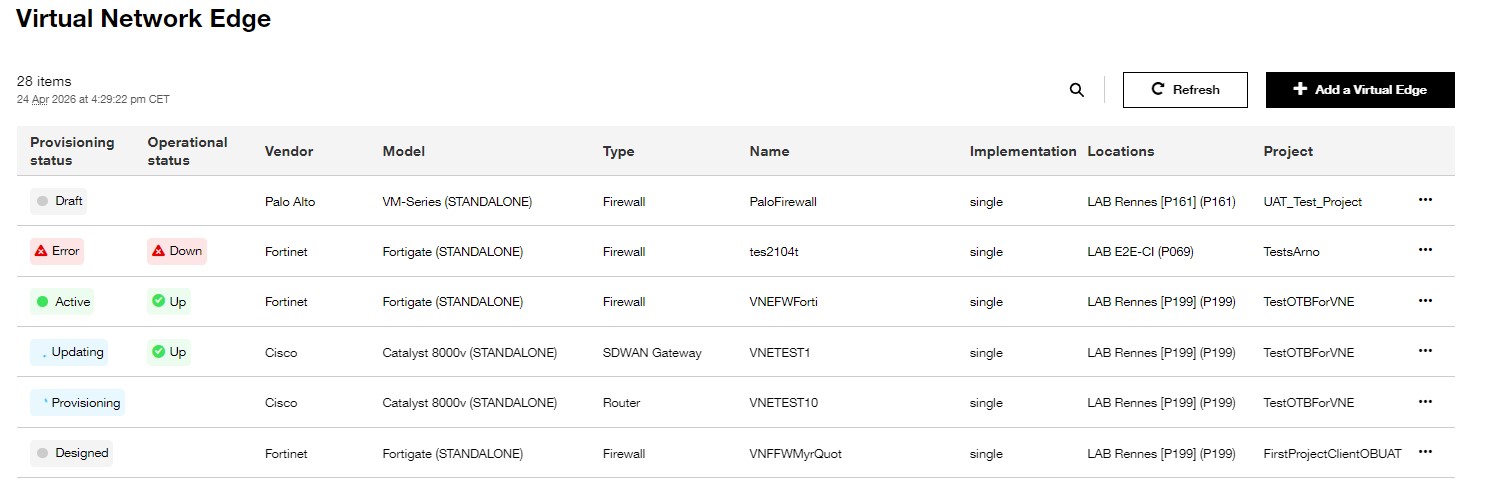
Overview of the inventory page.
This page is divided in eight columns:
- Provisioning status
- Operational status
- Vendor
- Model
- Type
- Name
- Implementation
- Locations
- Project
This page offers:
- “Add a Virtual Edge” button to create Virtual Edge which will be displayed in the inventory.
- Filter and search bar useful to find a specific Virtual Edge.
- Possibility to select line one by one.
- Pagination from 10 lines (per default) to 100 lines to display the Virtual Edge list.
Provisioning status of Virtual Edge
The different Virtual Edge provisioning status are described below:
| State of Virtual Edge | Description |
|---|---|
Draft | The Virtual Edge is saved with some information but all mandatory fields are not filled in. The Virtual Edge cannot be deployed with this status. |
Designed | The Virtual Edge is saved with all mandatory fields filled in. Virtual Edge can only be deployed with this status. |
Provisioning | The Virtual Edge is currently being deployed on Orange SuperPOP and the action is not yet completed. |
Active | The Virtual Edge is deployed on Orange SuperPOP with no error. All resources are created on Orange SuperPOP and the billing start. |
Updating | The Virtual Edge is currently being updated and the action is not yet finished. |
Error | The Virtual Edge is deployed on Orange SuperPOP with one or several error. |
Available actions on a Virtual Edge
Select a Virtual Edge and click on action to make an action on it. These actions are defined by the state of the Virtual Edge.
- Provision: Create all resources of Virtual Edge on the Orange SuperPOP.
- Deprovision: Delete the Virtual Edge resources on the Orange SuperPOP except the Public IP adresses associated.
- Delete: Delete all resources of Virtual Edge on Orange SuperPOP
- Unprovision: Delete all resources of Virtual Edge on Orange SuperPOP but keep resources of Virtual Edge in the Evolution Platform console. It is possible on redeploy these resources.
- Update: Allow you to modify characteristic values of Virtual Edge by coming back to the customer Journey.
Possible actions are based on Virtual Edge state:
| State of Virtual Edge | Available actions |
|---|---|
Draft | Delete, Update |
Designed | Provision, Delete, Update |
Active | Deprovision, Delete |
Error | Update, Delete |
States of Virtual device
| State of Virtual Device | Description |
|---|---|
Up | The Virtual Device is up and running. |
Down | The Virtual Device is is stopped (voluntary action). |
Allocated_ip | IP allocation has been done for the virtual device it is not deployed. |
Error | Virtual Device is in error on Orange superPoP. |
None | Configuration in progress but no provisioning has been made yet. |
Terminated | Virtual Device has been deleted from Orange superPoP. |
How to view the details of a Virtual Edge ?
Click on the three points at the end of the row to open the actions menu.

Overview of the “see details” button.