Aviatrix Edge WAN Connect Cluster - Specifications
Aviatrix Edge WAN Connect Cluster
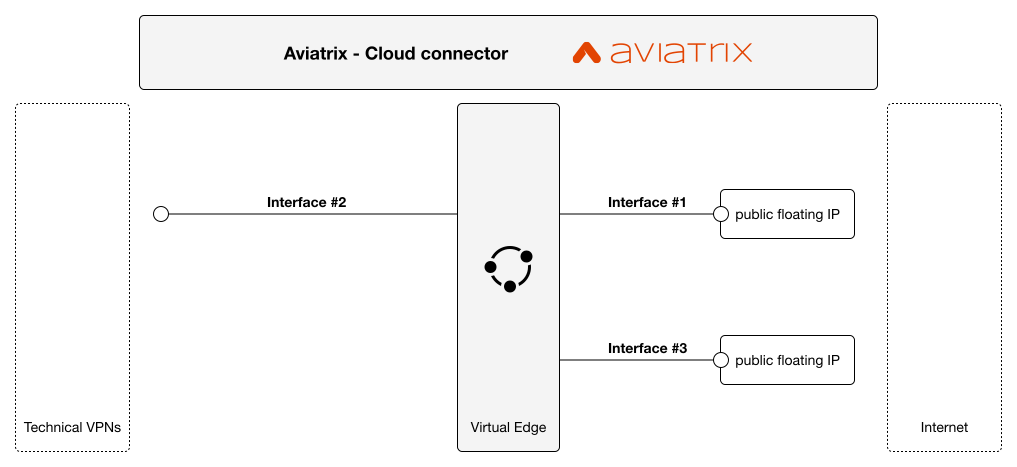
Aviatrix Edge WAN Connect Cluster VNF.
This VNF provisions two virtual machines in cluster mode, each configured with three interfaces: #1 - Technical-VPN interface, #2 - MPLS-VPN interface and #3 - Internet management interface. The specification lists cluster as the deployment mode but does not describe internal availability or failover mechanisms.
Flavors
The available flavors for this VNF are shown below. Choose a flavor that matches your expected resource needs when creating the VNF.
| Standard | DPDK | |
|---|---|---|
| Small | 2 vCPU 4 GB Mem 64 GB Disk | 2 vCPU 4 GB Mem 64 GB Disk |
| Medium | 4 vCPU 8 GB Mem 64 GB Disk | 4 vCPU 8 GB Mem 64 GB Disk |
| Large | 8 vCPU 16 GB Mem 64 GB Disk | 8 vCPU 16 GB Mem 64 GB Disk |
Interfaces
The diagram above shows the two virtual machines and their three interfaces. Each VM is attached to the Technical-VPN and MPLS-VPN interfaces and to the Internet management interface. The platform allocates and displays the Public IP addresses associated with the Internet management interface as platform-generated outputs.
Common interface configuration notes
Interfaces #1 and #2 share the same provisioning structure: both require a VPN list with at least one entry and allow optional BGP settings. To configure these interfaces you will typically:
- Provide a VPN list (one to 99 entries). Each entry requires a VPN Name (BVPN alias) and a VPN role (one of: any-to-any, client, server).
- Optionally toggle Activate interface (default: active).
- Optionally provide a BGP block when needed; sub-parameters are optional and the specification does not describe route advertisement behavior.
#1 - Technical-VPN interface
Used to connect to an Orange Technical-VPN. The VPN list is mandatory for this interface and must include at least one VPN entry with a VPN Name and VPN role. BGP may be configured if required by your deployment.
#2 - MPLS-VPN interface
Used to connect to an Orange MPLS-VPN. The VPN list is mandatory for this interface and must include at least one VPN entry with a VPN Name and VPN role. BGP may be configured if required by your deployment.
#3 - Internet management interface
This interface is informational in the provisioning schema. No customer input is required for this virtual network; instead, the platform allocates and displays Public IP address outputs for management per VM. These Public IP addresses are platform-generated outputs and are not customer-provided inputs.
Routing and BGP parameters
The platform exposes optional BGP configuration at the interface level for the Technical-VPN and MPLS-VPN interfaces. Use conservative values when enabling BGP:
- BGP enable (interface-level): optional toggle to enable BGP-related configuration.
- AS prepend: optional integer to indicate how many times to prepend the VM AS in the BGP AS Path. Valid values are integers between 1 and 6. The specification notes this parameter in the context of backup VM scenarios; it does not document routing policies or route advertisement specifics.
If BGP is not enabled, no BGP-specific configuration is applied through this setting.
Virtual device parameters
Both virtual machines share the same creation model for image, flavor and userdata. Provide these VM-level values during provisioning for each VM:
- VM name: hostname string (up to 22 characters) using letters, digits and hyphens. This is the VM identifier shown in the console.
- Image: select one of the supported software images listed in the Software section below.
- Flavor: select one of the supported flavors listed in the Flavors section.
- userdata: cloud-init content provided as base64-encoded data when requested by the console.
VM-specific exception:
- VM AS number: required for the first VM only. Provide a valid AS number (2- or 4-byte allowed) in the numeric range 1..4294967295.
Ensure VM hostnames respect the pattern and length constraints before deployment. Images and flavors must be chosen exactly as listed in the Software and Flavors sections.
Service specific parameters
Service specific parameters are service-level inputs required during provisioning. They are not VM names, interface IP addresses or platform-generated outputs. Provide these values in the console when requested.
-
Transit gateways networks
- What it is: a list of external network ranges expressed as IPv4 CIDR strings.
- Why the platform needs it: the provisioning workflow requires these network ranges to configure transit gateway relationships during creation.
- Expected value & constraints: provide between 1 and 9 IPv4 CIDR entries (CIDR notation). Each item is validated by the platform.
- Customer action: enter one or more transit gateway CIDR ranges. Do not confuse these with interface IPs.
-
Controllers network
- What it is: a single IPv4 CIDR string identifying the controllers network used by the service.
- Why the platform needs it: required by the provisioning workflow as a service-level parameter.
- Expected value & constraints: a single IPv4 CIDR in standard notation. Provide this value at creation time.
-
Copilots network
- What it is: a single IPv4 CIDR string identifying the copilots network used by the service.
- Why the platform needs it: required by the provisioning workflow as a service-level parameter.
- Expected value & constraints: a single IPv4 CIDR in standard notation. Provide this value at creation time.
These service-level networks are mandatory and are validated by the platform. They are distinct from VM-level or interface IP addresses.
Platform-generated outputs
The platform allocates and displays Public IP addresses for the Internet management interface of each VM as informational outputs. These are shown in the console after IP allocation and provisioning and are not customer inputs.
- Public IP address (management) for VM1 — displayed by the platform as an output after allocation.
- Public IP address (management) for VM2 — displayed by the platform as an output after allocation.
Software device versions
Below are the software image versions available for this VNF on the platform. Select one of these exact image names when creating the VMs.
- 7.0-2023-05-18
- 7.1-2023-04-24
- 8.0-2025-04-25
- 8.1-2025-07-29