Edit a VPN
VPNs from the BVPN offer listed in the inventory can be viewed, but cannot be modified or deleted !
From inventory, select the VPN to modify and click on the three dots in the row on the right, then click on "See details"

This page is displayed :
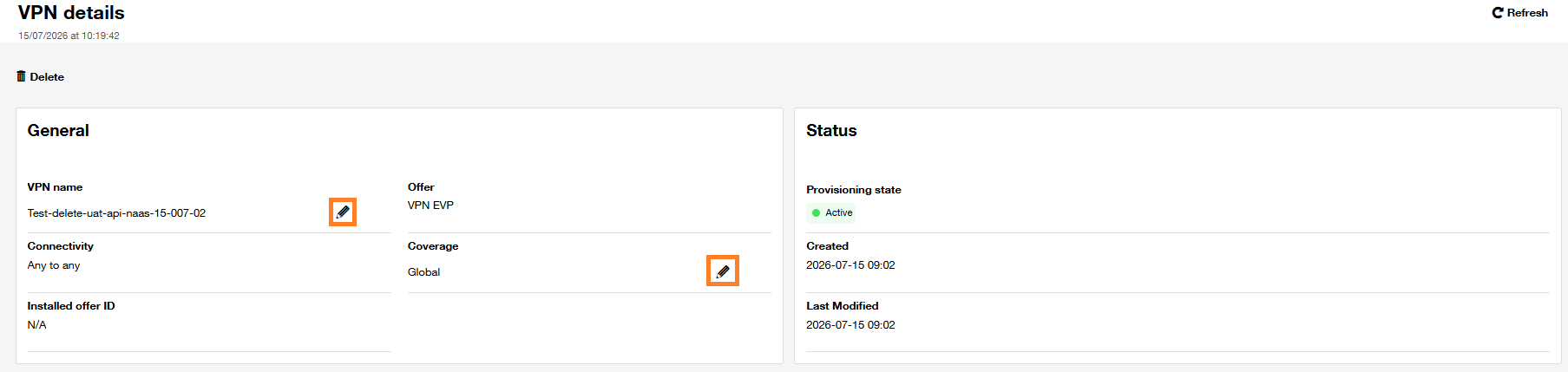
The two parameters you can edit are the VPN name and the coverage. To modify a parameter, click on the 'pencil' icon on the right
- VPN name update :
After clicking on the 'pencil' icon, the following popup will be displayed :

Enter the new name you want in the "VPN name" field
Below the "VPN name" field, you can still see the current VPN name in gray.
Check the box "I confirm that the change is correct", then click OK
- VPN coverage update :
After clicking on the 'pencil' icon, the following pop-up will be displayed :
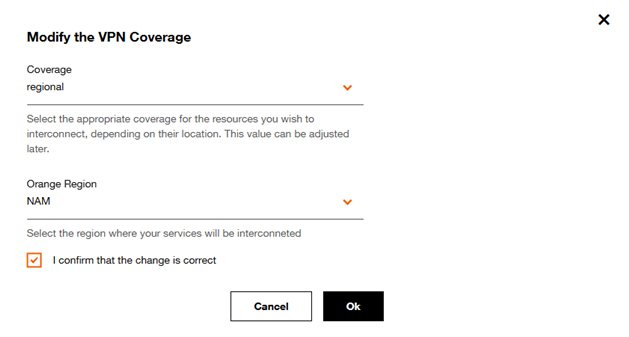
Select the desired VPN coverage :
-
If you select the “Local” coverage, please choose the Super Pop location for your interconnected services.
-
If you opt for the “Regional” coverage, select the region where your services will be interconnected.
Apply the requested changes, check the box “I confirm that the change is correct”, and click Ok