Inventory
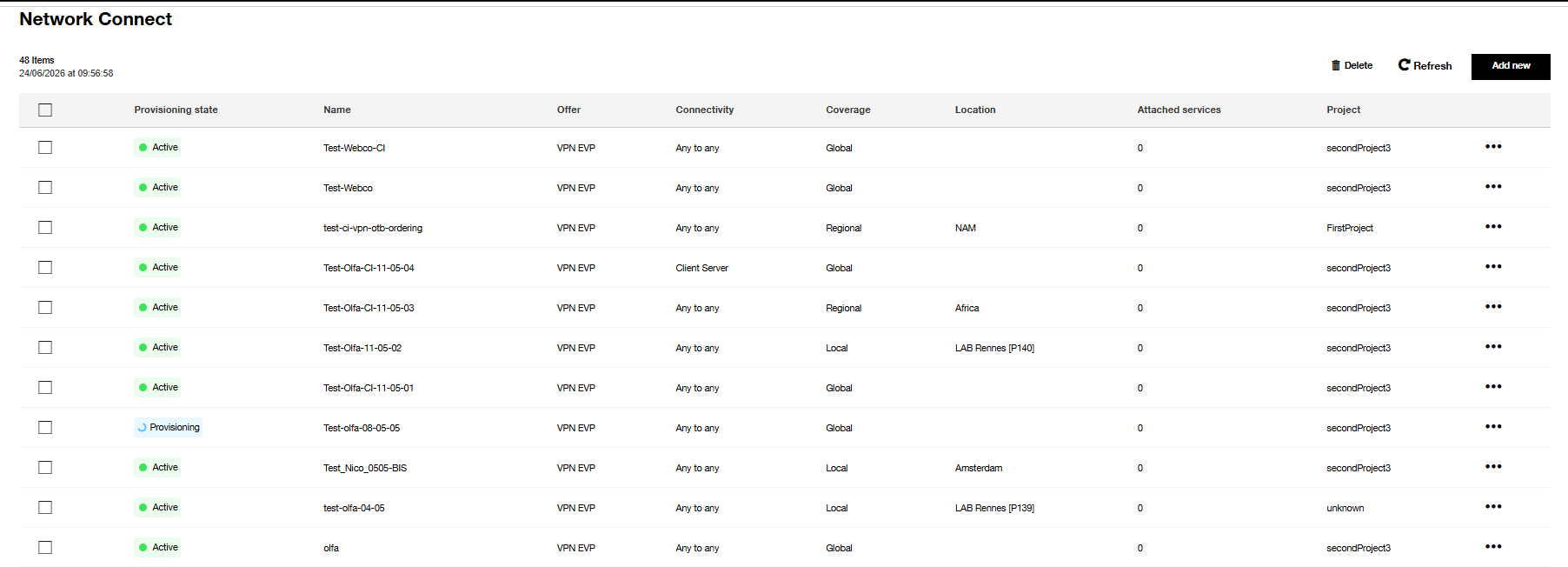
Inventory columns description
| Column | Description |
|---|---|
| Provisioning state | Status of VPN could be Active, Provisioning or Error |
| Name | VPN name defined by the user |
| Offer | Could be VPN EVP or BVPN |
| Connectivity | Connectivity type could be Client Server or Any to Any |
| Coverage | VPN coverage could be Local, Regional or Global |
| Location | It is related to the type of coverage chosen |
| Attached services | Number of attached services by the VPN |
| Project | Project name defined by the user, and where the VPN is created (only for VPN EVP) |
Global actions
- Delete : Remove a single selected VPN or remove multiple VPNs in bulk from the inventory. See Delete a VPN
- Refresh : Manual inventory refresh, note there is an automatic page refresh when there is an on-going action on a VPN.
- Add a new : This button to create a new VPN which will be displayed in the inventory. See Create a VPN
Per VPN actions
- Delete : Remove a VPN from the inventory. See Delete a VPN
- See details : VPN parameters provided by user and calculated by our application during workflows. See VPN details
States of VPN
- Active : The service is running
- Provisioning : Transitional state. Processing the current request to activate the service
- Error : The request processing raises an error
Note
VPNs from the BVPN offer listed in the inventory can be viewed, but cannot be modified or deleted.